

Check out the latest research from IONIX: NEW! State of the WAF Report

New CVE Detected

CVE-2026-88119 – RCE – Windows Server DHCP Server (2012 through 2025)

Be the first to know when new zero-days emerge:

Summary

CVE-2026-88119 is a use-after-free (CWE-416) remote code execution vulnerability in the Windows DHCP Server role. It affects Windows Server 2012 through Windows Server 2025. It has a CVSS v3.1 base score of 8.1 (High). An unauthenticated attacker can exploit it over the network to execute code.

Technical details

  • Root cause: use after free (CWE-416) in Windows DHCP Server.
  • Trigger conditions: the vulnerable builds listed below must be running the DHCP Server. The CVSS vector rates attack complexity as High.
  • Attack vector: network. No privileges and no user interaction are required.
  • Impact: remote code execution, with high impact on confidentiality, integrity and availability.

Affected software

Standard and Server Core installations of the following builds are affected:

  • Windows Server 2012 (x64): 6.2.9200.0 – 6.2.9200.26433
  • Windows Server 2012 R2 (x64): 6.3.9600.0 – 6.3.9600.23469
  • Windows Server 2016 (x64): 10.0.14393.0 – 10.0.14393.9611
  • Windows Server 2019 (x64): 10.0.17763.0 – 10.0.17763.9375
  • Windows Server 2022 (x64): 10.0.20348.0 – 10.0.20348.5760
  • Windows Server 2025 (x64): 10.0.26100.0 – 10.0.26100.33649

Severity

CVSS v3.1 base score: 8.1 (High). Vector: CVSS:3.1/AV:N/AC:H/PR:N/UI:N/S:U/C:H/I:H/A:H. The published record also carries the temporal metrics E:U/RL:O/RC:C.

Mitigation and recommended actions

  • Immediate: apply the Microsoft security update for your Windows Server version. The update is listed in the MSRC advisory for CVE-2026-88119. Move every affected server above the build numbers listed.
  • Check which servers run the DHCP Server role and patch those first.
  • If you can’t patch right away, restrict network access to DHCP Server hosts so that only the required client segments can reach them. This is general hardening. The sources reviewed list no vendor-specified workaround.
  • IONIX flags assets as potentially affected from an HTTP Server header only. It doesn’t show whether the DHCP Server role is installed or which build is running. Confirm both on each flagged host.

References

Get a free Attack Surface scan to see if you’re exposed.

Get a free Attack Surface scan to see if you’re exposed.

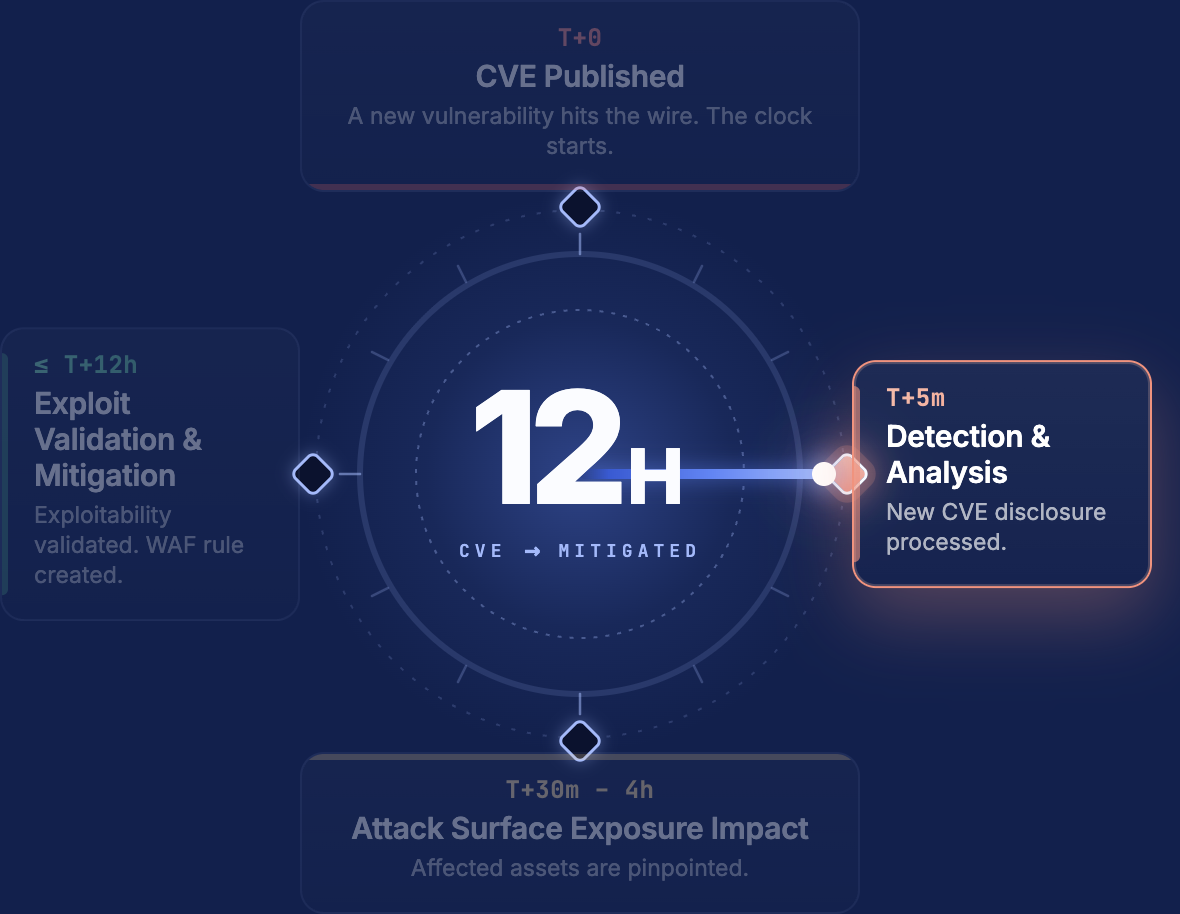
How IONIX’s External Exposure Management Platform Detects and Validates
Zero-Days to Shrink MTTR

1

Map your entire attack surface (continously)

IONIX uses multi-factor discovery methods, including DNS analysis, certificate mapping, metadata inspection, and more, to automatically map every internet-facing asset across your environment. This includes cloud instances, third-party platforms, shadow IT, and even forgotten infrastructure that traditional tools miss.

2

Monitor for new CVEs

Dozens of threat intel feeds using agentic technology are continuously analyzed to detect the appearance of proof-of-concept code, exploit kits, and indicators of active targeting. IONIX goes further by applying AI to proactively evaluate whether emerging vulnerabilities are likely to be exploited, even before PoCs go public.

3

Identify Potential External Exposures

Not all CVEs matter. IONIX filters vulnerabilities by asking attacker-centric questions: Can it be reached from the internet? Does it require authentication? Is it being exploited in the wild? This dramatically reduces noise and focuses teams on threats that can actually be weaponized.

4

Create Safe, Scalable Exploit Validations

IONIX transforms real-world PoCs into safe, non-intrusive test payloads that can be run in production environments without disruption. These simulations are precisely targeted to the systems that are vulnerable, ensuring rapid validation without unnecessary load.

5

Execute Exploit Validations

By combining context about software stack, versioning, exposure status, and reachability, IONIX ensures that only the right payloads are executed against the right assets, maximizing efficiency and minimizing risk.

6

Drive Fast and Actionable Remediation

Results are routed through integrations with ticketing, SOAR, and SIEM tools. Issues are written in plain language, bundled into remediation clusters, and prioritized based on asset criticality, exploitability, and blast radius. This shortens mean time to remediation (MTTR) and empowers teams to act with confidence.

Are you exposed?

Get a free report of your organization’s exposure to this CVE and threat

Subscribe to Threat Center RSS

Copy/paste the link below into your preferred RSS reader or follow these instructions to subscribe to Slack alerts.

Get Real-Time CVE Alerts to Your Email

Be the first to know when new zero-days emerge