
Building a Data-Driven WAF Deployment Strategy: Where to Roll Out WAF Protection First


Most security teams cannot deploy a web application firewall (WAF) across every web asset at once. Each deployment demands testing, rule tuning, and an operational handoff to the team that will run it. So the real question is not whether to deploy WAFs. It is which assets get protection first, and in what order. Teams that skip this question default to deploying where the business shouts loudest, which is rarely where an attacker looks first. A data-driven WAF deployment strategy replaces that guesswork with a defensible sequence tied to risk.
Why WAF prioritization decides where breaches start
An attacker does not care which of your web properties the marketing team considers important. They probe for the exposed asset that takes input, handles credentials, or runs a vulnerable component, and they find it fast. The volume of new flaws keeps that search well supplied: 40,009 CVEs were published in 2024, an average of 108 per day, according to Jerry Gamblin’s 2024 CVE Data Review of National Vulnerability Database records. Most enterprises can account for only part of their actual external attack surface, so a meaningful share of the assets that need a WAF are not even scoped for one.
When deployment order gets set by internal politics, the customer authentication portal can wait behind a rebranded landing page because a business unit lobbied harder. WAF prioritization corrects that. It ranks every web-facing asset by the factors that predict real-world exploitability and business damage, then sequences deployment against that ranking. The output is a roadmap you can defend in a room full of stakeholders who each think their asset comes first.
The six factors in a data-driven WAF rollout
IONIX scores each web asset across six weighted factors. These weights are IONIX’s prioritization model, set so the ranking reflects what drives risk rather than whoever asked last.
| Factor | Weight | What it measures |
|---|---|---|
| Traffic volume | 25% | A portal with 100,000 monthly visitors carries far more risk than a test site with 10. High-traffic assets are bigger targets and bigger blast radii. |
| Business criticality | 20% | A customer portal or checkout flow ranks above a marketing blog. Criticality reflects revenue, data sensitivity, and operational dependence. |
| Vulnerability exposure | 20% | Assets with known web application flaws need a WAF first. A confirmed injection point is a live invitation. |
| Attack surface | 15% | OWASP Top 10 vectors concentrate where users submit data. Input forms, login pages, and search fields expose more than read-only content. |
| Hosting environment | 10% | Cloud-hosted assets can be harder to protect at the origin, which raises the value of an edge WAF. |
| Regulatory or regional impact | 10% | Assets in scope for GDPR or other regimes carry compliance consequences on top of security ones. |
Traffic volume carries the heaviest weight because it combines two attacker signals in one number: exposure and reward. A high-traffic asset is easier to find and worth more to compromise. Vulnerability exposure and attack surface together account for 35%, which keeps the score anchored to what an attacker can act on rather than to abstract importance. The OWASP Top 10 defines the input-driven risks a WAF is built to blunt, from injection to broken access control, so an asset covered in forms scores higher than a static page by design.
The tiered deployment output
The scores resolve into three deployment tiers. Each tier carries a rationale tied straight back to the factors, so no one has to take the sequence on faith.
Tier 1: deploy now
The highest-scoring assets get a WAF immediately. These are your customer authentication portals, payment processing pages, and API endpoints handling personally identifiable information (PII). They score high on nearly every factor: heavy traffic, maximum business criticality, dense input surface, and regulatory scope. An exposure here reaches sensitive data and real revenue. Waiting is the risk.
Tier 2: deploy in 30 to 60 days
The next band covers secondary customer portals, internal admin dashboards, and API endpoints that handle non-sensitive data. These assets matter, but they score lower on traffic, data sensitivity, or exposure than Tier 1. The window gives your team time to tune rules and hand off operations without leaving the crown jewels waiting behind them.
Tier 3: deploy in 90 to 180 days
The lowest band holds blog and marketing sites, low-traffic legacy systems, and test and development environments. Low traffic, limited business criticality, and thin input surface put them last. They still get a WAF, because an unmonitored legacy box is exactly where an attacker pivots. They simply do not jump the queue ahead of a payment page.
The sequence turns “why this asset first” from a standing argument into a scored list anyone can read. When a business unit asks why their portal sits in Tier 2, the answer is a number, not an opinion.
Auto-alerts keep the roadmap from going stale
A ranked deployment plan is only as current as your asset inventory, and enterprise web estates change every week. Subsidiaries spin up new portals. An acquisition brings domains nobody scoped. A cloud migration quietly drops WAF coverage that was there last quarter.
IONIX starts from a complete organizational entity map rather than a seed list, so discovery reaches the subsidiaries and acquired brands that seed-based tools miss. When it discovers a new web asset, it scores that asset for WAF priority against the same six factors and classifies its protection status. If a high-priority asset is unprotected, or a formerly protected one drifts into monitor-only mode, the team gets an alert instead of a surprise. The three protection states make the gap explicit:
- Protected: active WAF in blocking mode with current rules.
- Underprotected: WAF present but running in detection-only mode, with outdated rules, or with a bypass path.
- Unprotected: no WAF detected.
That classification answers the question most teams cannot answer today: which web assets are actually protected, and which are exposed or sitting in monitor-only mode. Tracking that across Cloudflare, AWS WAF, Azure WAF, Akamai, and the rest usually means checking one console per vendor and stitching the results into a spreadsheet. A vendor-agnostic view collapses that into a single answer. For teams running WAFs across multiple cloud providers and vendors, that unified coverage picture is the difference between a live roadmap and a stale one.
From coverage to confirmed mitigation
Deployment order is the start of a WAF program, not the finish. Once an asset is protected, the question becomes whether that protection actually blocks what an attacker would try, and what happens the next time a relevant CVE drops.
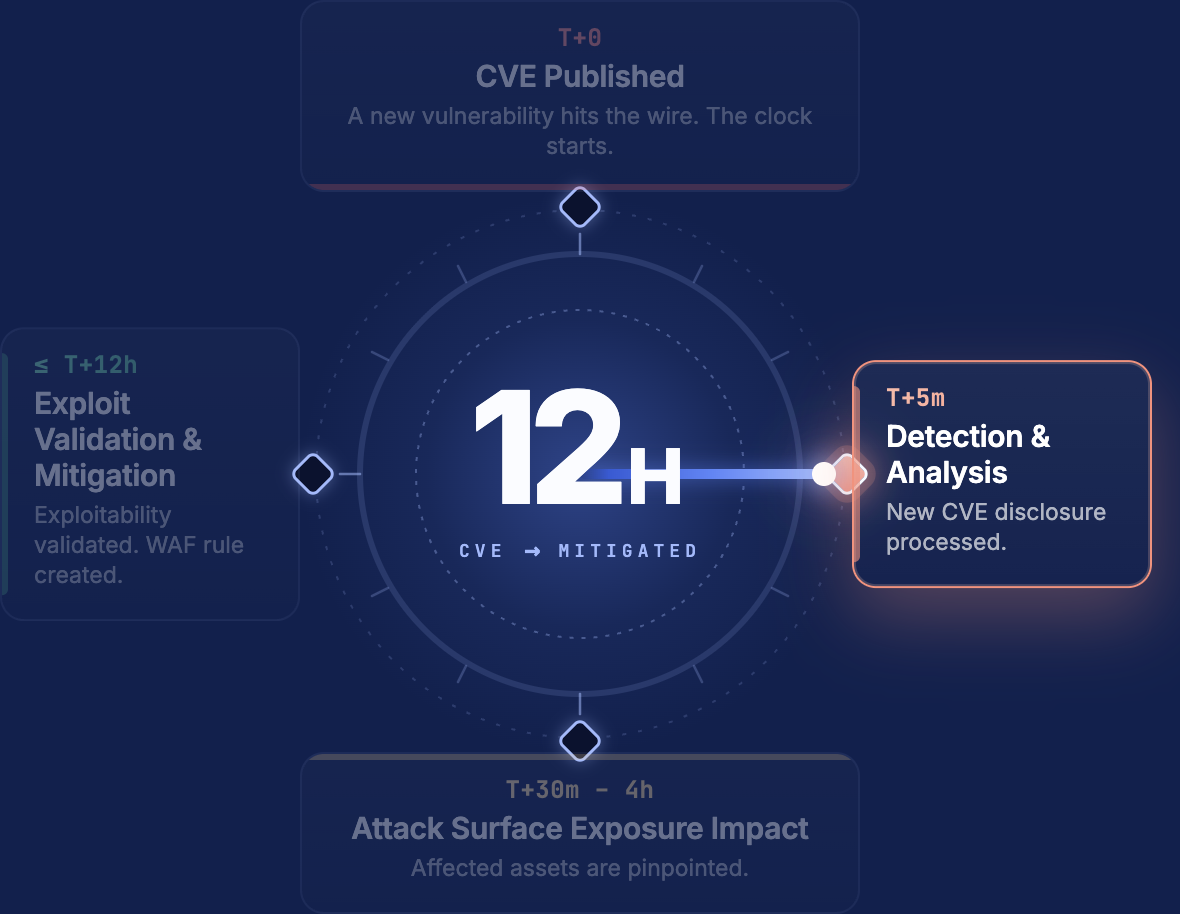
IONIX validates each WAF externally rather than trusting the vendor console, confirming the control blocks real attacks instead of logging them. When a new CVE hits a web asset you own, Live Exposure Defense commits to identifying every potentially affected asset within 12 hours of publication, and for confirmed exploitable web assets it recommends a specific WAF rule ready to deploy through Akamai, Cloudflare, AWS, Azure, Imperva, Fortinet, and other supported vendors. Prioritization tells you where to put a WAF. Validation and rule generation tell you whether it works and what to change when the threat moves.
A data-driven WAF deployment strategy earns its keep twice. First it sequences the rollout by risk, so the customer portal gets protected before the marketing blog. Then it keeps that sequence honest as the estate grows, alerting when a high-priority asset shows up unprotected. The result is a plan you can defend with a score instead of a hunch. See how IONIX maps and prioritizes WAF coverage across your web estate.
FAQs
Score each asset against weighted risk factors: traffic volume, business criticality, vulnerability exposure, input surface area, hosting environment, and regulatory scope. Assets that score highest across those dimensions, typically customer portals, payment pages, and PII-handling API endpoints, get deployed first. The scoring replaces internal lobbying with a defensible, repeatable ranking.
For most enterprises, expect three to six months across three tiers. Tier 1 (highest-risk assets) should go live immediately. Tier 2 follows within 30 to 60 days, giving teams time to tune rules without leaving critical assets exposed. Tier 3 covers lower-risk properties like blogs and test environments over the following 90 to 180 days. The exact timeline depends on how many web assets your organization operates and how many WAF vendors are in the mix.
Any deployment plan goes stale if your asset inventory does. IONIX continuously discovers new web assets, including those belonging to subsidiaries and acquisitions, scores them against the same six prioritization factors, and classifies their WAF protection status. If a high-priority asset appears without WAF coverage, your team gets an alert before an attacker finds it.
Yes. IONIX validates WAF effectiveness from the outside, the same position an attacker occupies. Rather than trusting a vendor console’s self-reported status, IONIX tests whether the WAF blocks real attack patterns. It also detects configuration drift, such as a WAF that has dropped from blocking mode to monitor-only, and flags the change.
IONIX recognizes 50+ WAF products, including Cloudflare, AWS WAF, Azure WAF, Akamai, Imperva, Fortinet, Barracuda, and Fastly. The platform provides a single, vendor-agnostic view of WAF coverage across your entire web estate, so you do not need to check each vendor’s console separately to answer “which assets are protected?”